
A place for every side of your life
Dairati is an app that keeps your prayers, sleep, money, work and family in one place. Log your day in a minute and see the whole picture.
Sound familiar?
You start with energy. One app for prayer, another for workouts, a spreadsheet for spending. Two weeks later none of them knows about the others, and you forget why you started. And nobody answers the one question that matters: how was my life this week, all of it?
- Many apps, no single picture. Prayer in one app, money in a spreadsheet, sleep in your memory. Nothing brings them together.
- The goal fades after the first week. You write a goal, forget it, then blame yourself. The page never reminds you, and never forgives a missed day.
- No number tells you how the week went. You feel you fell short, but you can't say where, or where you improved.
Three steps, nothing more
- Add your tasks.From “Add task” you pick from each area's ready tasks or write your own, and put it in the morning, the day or the evening.
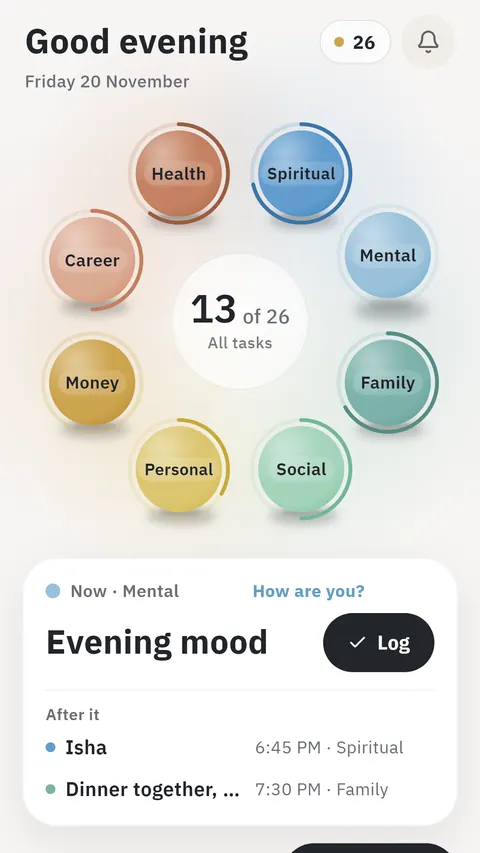
- Log your day from “My day”.The “Now” card shows your next task of the whole day, one tap logs it, then “After it” appears. A long press records how it went.
- Watch your wheel fill up.Each area is a ball on the wheel, with today's done tasks in the middle. In “Reports” inside each area: today, yesterday and the last seven days.
Eight areas, one wheel
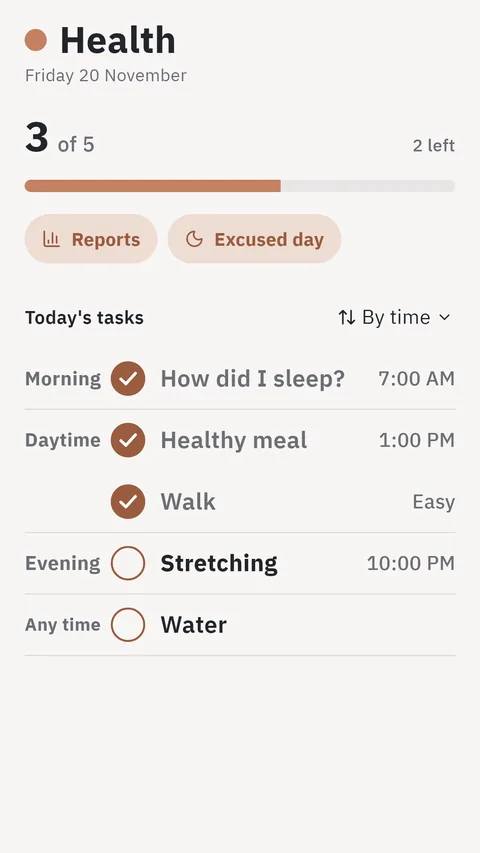
Each area has its tasks for the day and its reports. Tap its ball to see its tasks for the morning, the day and the evening, and leave what you don't need. None of your friends see your notes and thoughts; “AI” reads them to analyse your days, if you turn it on.
- SpiritualYour five prayers in one tap with your khushu, prayer times by your approximate location from the “Location” button, and tasks like your Quran reading, morning and evening dhikr, and charity.
- MentalTasks for your mood, calm and thoughts: logging your mood, a breathing exercise, a few minutes of silence, and three blessings you write down.
- FamilyTasks for your family and home: calling your parents, visiting family, playtime with your children, and a meal together without phones.
- SocialTasks for the people around you: a call or a message, meeting a friend, asking after someone absent, a small favour, and meeting someone new.
- PersonalTasks for your books, learning, routine and dreams: reading before bed, a language lesson, your morning routine, and a step towards a dream.
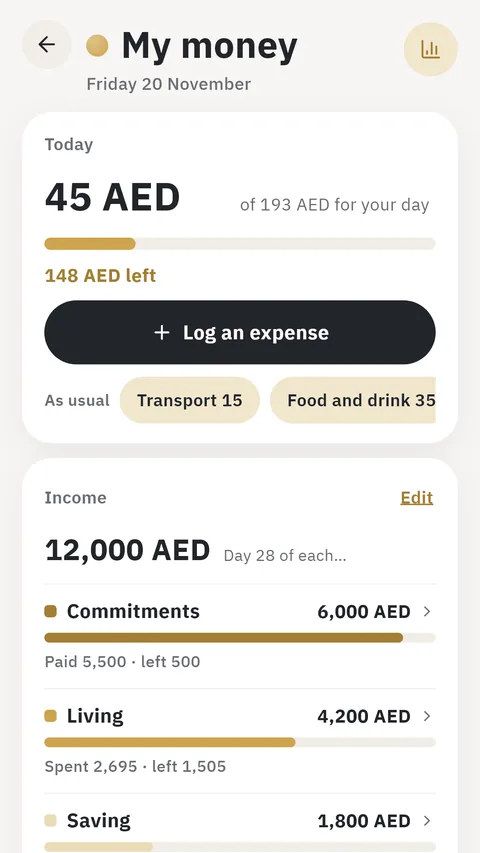
- Money“Wallet”: what you spent today against your daily share, the “Income split” into commitments, living, saving and pockets you add, each with its categories, and logging your spending.
- CareerTasks for your work and studies: your most important work task, preparing a meeting, studying a subject, homework, and tomorrow's plan.
- HealthTasks for your health: a walk, drinking water, a healthy meal, stretching, sleep before eleven, and “How did you sleep?” each morning.
“AI” reads your days and suggests a step
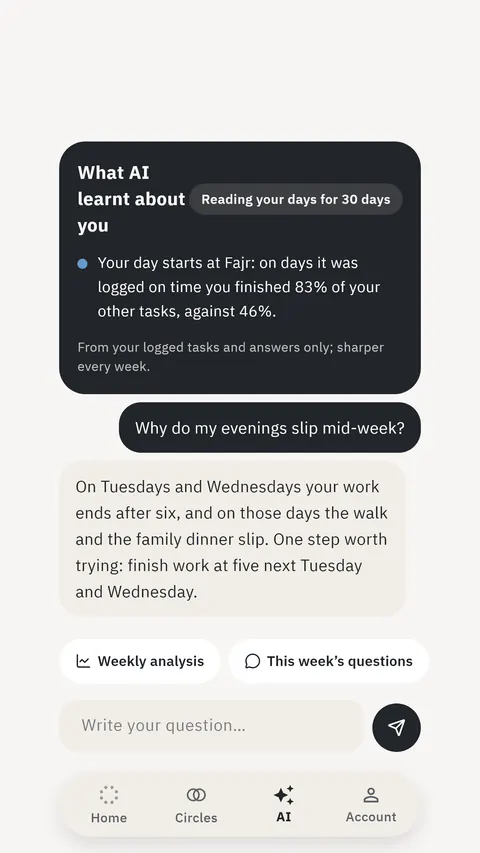
In the “AI” tab you ask it: why don't I stick to it? Which area pulls the others down? It reads what you write in the app: your tasks and which are done, your sleep and mood, your notes and thoughts. It links your areas, suggests one step from your numbers, turns a sentence of yours into tasks, and arranges your day across its parts.
- A report every Friday. What went well, what slipped, and how one area affected another.
- It reads what you write, to analyse it. “AI” reads what you write in the app, your notes and thoughts included, without your email or full name. None of your friends see it.
- Up to 5 questions a day. You turn it on yourself, and you can turn it off any time. Turning it off deletes the whole chat and its reports.
Friends who walk with you
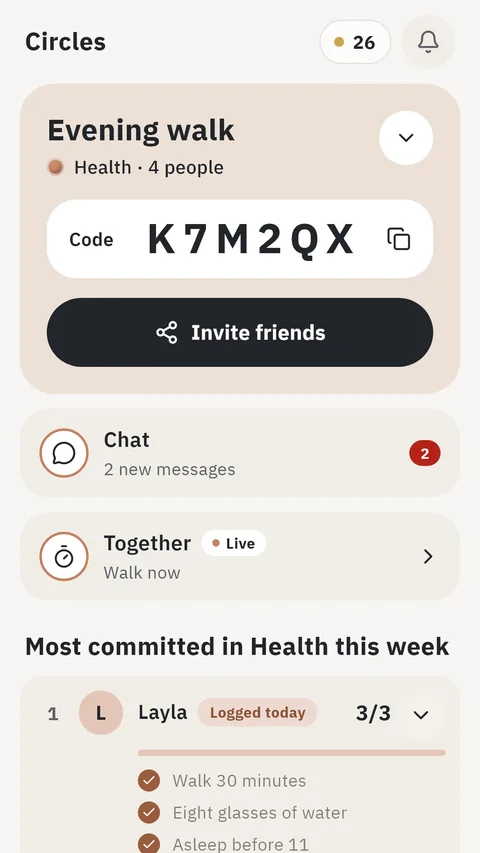
Pick an area, create a circle for it, and send its code to your friends. Each of you keeps your own tasks, and every day you see each other's tasks in that area, so you cheer whoever got them done and remind whoever went quiet.
- They see your tasks in the circle's area only. Your friends in the circle see the titles of your tasks for today in its area and which are done, your figure for the day and the week, and your streak. They see nothing of your other areas, and none of your notes and thoughts.
- A chat and “Together”. Talk in the circle, and start an activity at the same time: a walk, reading, Quran, or focus.
- The circle asks after whoever went quiet. If one of you slips for a few days, the circle gets a nudge to check in.
- A six-character code. One circle per area, and joining is by code only.
Your data is yours
- No ads.There are no ads in the app, and we share your data with no advertiser.
- Your data is not for sale.We don't sell it or use it for advertising, and nobody in the app sees it but you, except what the friends of a circle you join see in its area only.
- Delete what you want.Any entry, or the whole account, from inside the app: “My account”, then “Delete account”.
- We wrote it all down.What we collect and why, who processes it, and how long we keep it: in the privacy policy.
Questions you may have before downloading
Do I need internet?
You can log your day offline, and the app sends it when the connection returns. Signing in needs a connection.
Arabic or English?
Both. Switch the language from “My account” whenever you like, and the whole app follows.
Can I use just one area?
Yes. Add your tasks in the one area you want, and the other balls stay on the wheel until you need them.
What if I miss a day?
Nothing is lost, and nobody asks you to make it up. If you know you can't, an area's tasks page has “Excused day”: that day isn't counted in the area.
How do I delete my data?
From inside the app: “My account”, then “Delete account”, then type “delete”. The app deletes the account and its entries at once, and backups clear within two weeks.